![Email Signature_CM.png]](https://kb.connectedmanufacturing.com/hs-fs/hubfs/Email%20Signature_CM.png?height=40&name=Email%20Signature_CM.png)
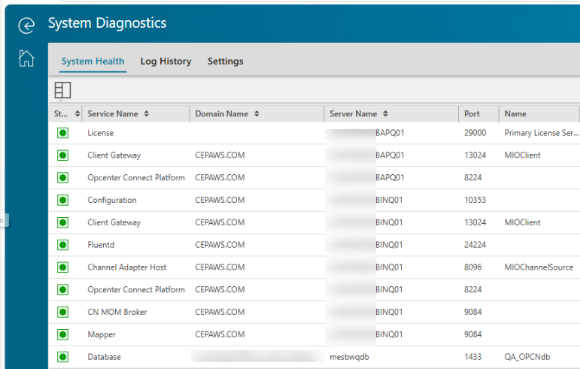
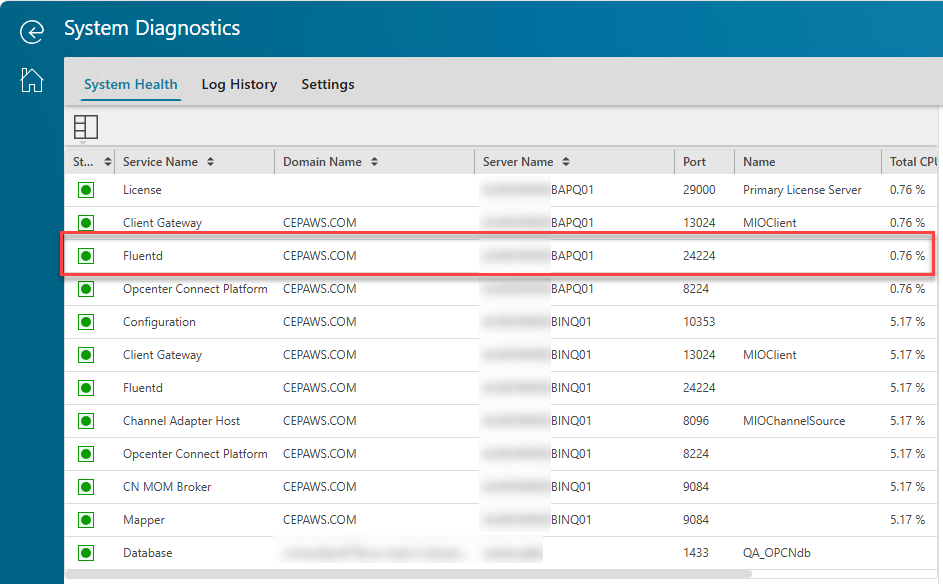
Issue: The FluentD on the App Server no longer appears in System Diagnostics after it remained in a FAILED state for an extended period.
According to the Siemens' developers restarting the Client Gateway service should re-add the missing Fluentd service. If restarting the Client Gateway doesn't work, you can insert a new row into the Installed Components table in the database.
Note the following variables need to be updated to match your system.
-
DBName
-
Schema
-
DomainVariable
-
MachineNameVariable
-
IPAddressVariable
INSERT INTO [DBName].[Schema].[mio_InstalledComponents]
(
InstallTime,
Domain,
MachineName,
IPAddress,
Port,
ServiceName,
LastStatusCheck,
Scheme,
ValidationDate,
ValidationAttempts,
IsActive
)
VALUES
(
GETDATE(),
'DomainVariable',
'MachineNameVariable',
'IPAddressVariable',
24224,
'Fluentd',
NULL,
'HTTP',
GETDATE(),
0,
1
);
SAMPLE:
Before
After
Reference IR: Support Center