![Email Signature_CM.png]](https://kb.connectedmanufacturing.com/hs-fs/hubfs/Email%20Signature_CM.png?height=40&name=Email%20Signature_CM.png)
Problem Description: The customer encountered the following error while moving the container "4551930-10" to the next step.
Error: Move-in is required for 'ASPD-PED-SET-2601-4' at operation 'USTEC-ASPD-TPM-Close' using resource '0'.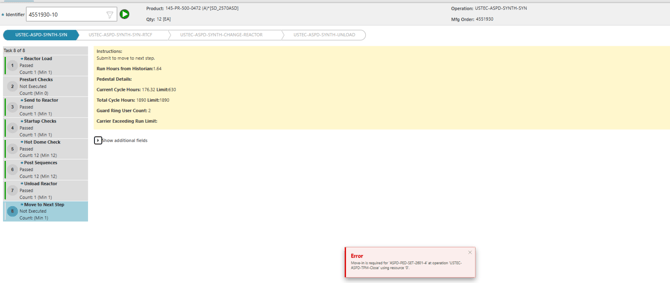
Troubleshooting Steps:
-
Check whether any recent changes have been made to the affected Spec or Task List.
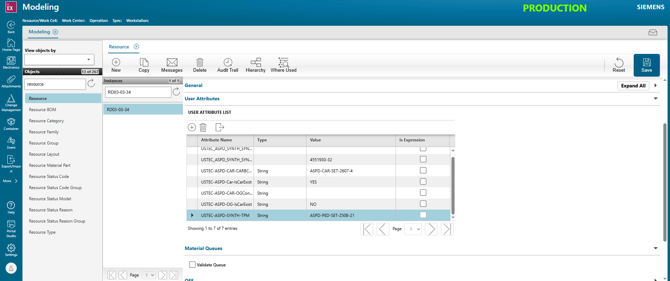
Findings: A recent change was identified in which a value was added for the "USTEC-ASPD-SYNTH-TPM" attribute of resource "RD03-03-34".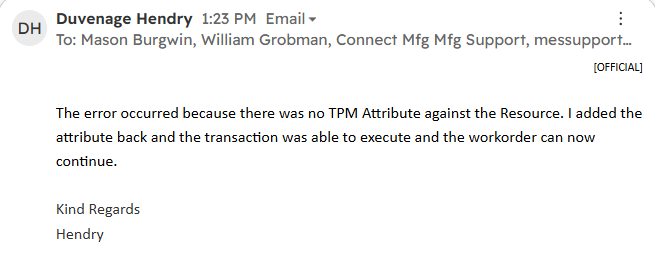
- If there were any changes, verify the configuration.
Findings: Reviewed the resource attribute "RD03-03-34" configuration and confirmed that the value assigned to the "USTEC-ASPD-SYNTH-TPM" attribute was container "ASPD-PED-SET-2601-4".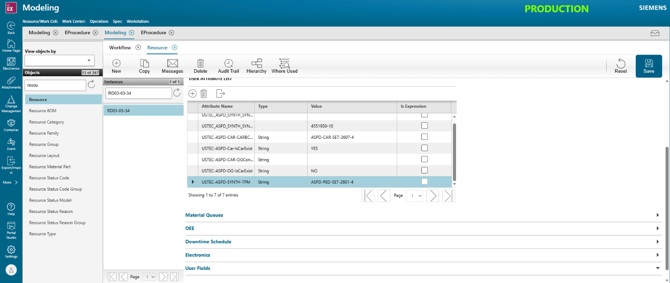
- Check the assigned Container's Status to determine whether it can perform the required operation.
Findings: Checked the workflow status of container "ASPD-PED-SET-2601-4" and it was at the last step of the workflow, which was closed.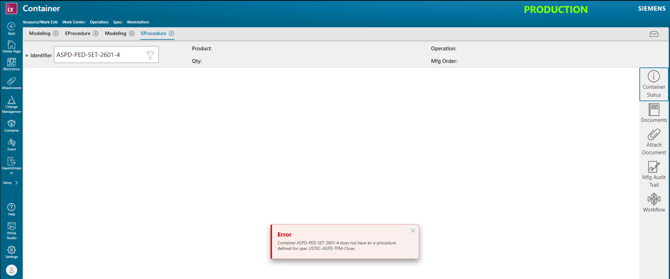
Therefore, it could not proceed through the required operation, resulting in the Move-in error.
Resolution: The issue can be resolved using either of the following approaches:
-
A Move Non-Standard is to be performed on the container "ASPD-PED-SET-2601-4" to move it another spec where it can proceed through the required operation.
- The value of the "USTEC-ASPD-SYNTH-TPM" attribute for resource "RD03-03-34" is to be changed to an open container.
- After completing either approach, the main container "4551930-10" is to be re-executed.
Result: The error was resolved, and the container succesfully progressed to the next step.